
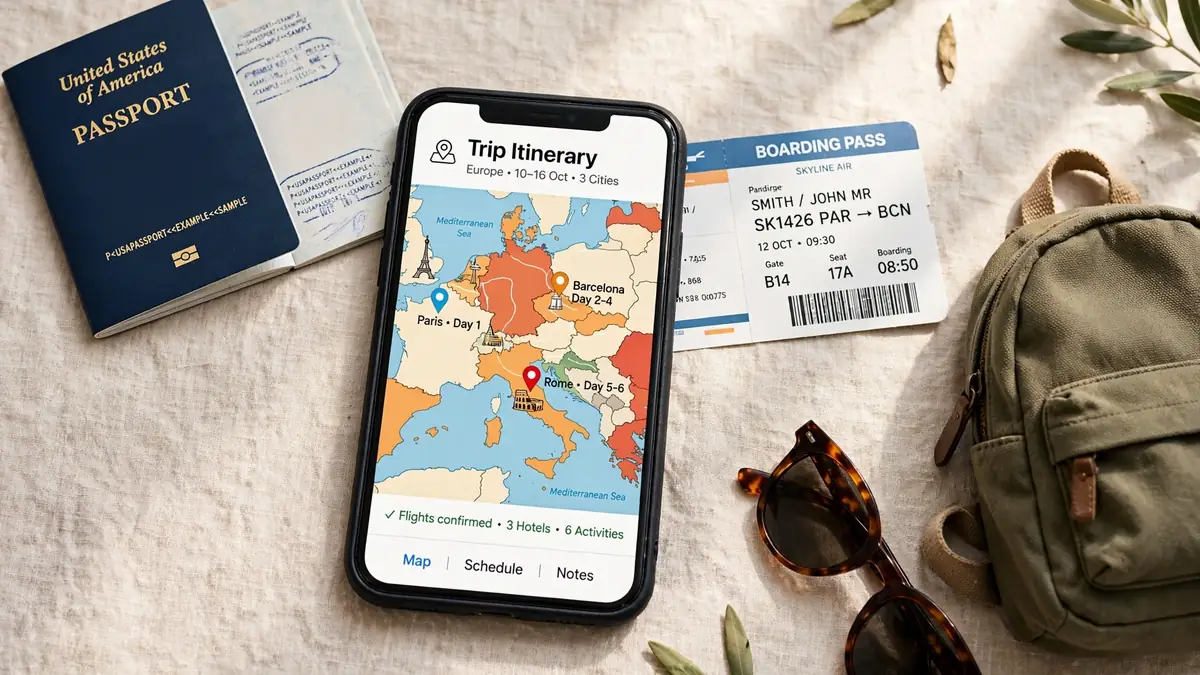
Your phone can plan a whole trip now. However, most travellers install apps in a panic. Consequently, they end up with twelve icons and no system. In contrast, the best travel apps work as a small stack. Each app handles one stage really well. Therefore, this guide organises choices by trip stage. Additionally, it gives free-versus-paid verdicts for every stage. Finally, it adds simple privacy checks before you install anything.
Firstly, think about how a trip actually unfolds. You dream and research first, obviously. Next, you book flights, trains, and stays. Then, travel day brings delays and gate changes. After that, you navigate, translate, and find food. Meanwhile, money questions follow you the whole way. So, why should one app try to do everything?
How should you build a travel app stack?
Simply put, you need one strong app per job. Admittedly, a few travellers prefer one giant organiser. Others, however, prefer best-in-class tools for each stage. Either way, overlap creates confusion and duplicate alerts. For example, two itinerary apps will send conflicting reminders. As a result, you might miss the one alert that matters. Therefore, pick a primary app for each stage below.
Moreover, keep your stack deliberately small and tidy. Five or six apps cover most trips comfortably. Indeed, every extra app adds another account and password. Besides, each new account shares more personal data. Nevertheless, do not fear paid tiers automatically. Some paid tiers genuinely save time and stress. Conversely, many free tiers are surprisingly complete already.
| Trip stage | Best pick | Strong alternative | Free tier verdict |
|---|---|---|---|
| Planning and itinerary | Wanderlog | TripIt | Both usable free; paid adds polish |
| Cheap flights | Skyscanner | Google Flights in browser | Free search; you pay the airline |
| Flight tracking | Flighty on iOS | Airline app alerts | Free basics; paid adds live detail |
| Getting from A to B | Rome2Rio | Google Maps directions | Free and usually enough |
| Trains in Europe | Trainline | Omio | Free to search; booking fees vary |
| Navigation offline | Google Maps downloads | Organic maps style apps | Free and very capable |
| Group expenses | Splitwise | Notes app plus honesty | Free core splitting works well |
| Road trips | Roadtrippers | Google Maps lists | Free discovery; paid unlocks planning |
| Mobile data abroad | eSIM apps | Local SIM on arrival | No free data; simple setup instead |
| Translation offline | Google Translate downloads | Apple Translate on iPhone | Free language packs included |
Stage one: planning and building your itinerary
Good trips start with a clear, shared plan. However, plans often live in scattered screenshots. Additionally, booking emails bury the details you need. Therefore, a dedicated organiser earns its place quickly. When people compare the best travel planner apps wanderlog vs tripit, they usually compare two philosophies. Wanderlog feels like a collaborative trip notebook. TripIt, meanwhile, feels like an automatic filing cabinet.
Wanderlog or TripIt: which organiser suits you?
Wanderlog suits planners who enjoy building days visually. You can pin places on a map easily. Furthermore, you can share the plan with companions. Friends can then add ideas and comments directly. As a result, group planning feels far less chaotic. For instance, planning places to visit in NYC with kids becomes a shared family list. Importantly, Wanderlog works on both Android and iOS.
TripIt suits travellers who hate manual entry instead. You forward booking emails to the app. Subsequently, it builds a timeline from those emails. Consequently, flights, hotels, and cars appear in order. That automation makes TripIt a strong best itinerary organizer app for busy people. However, free and paid tiers differ in extras. The paid tier adds alerts and richer travel tools. Still, the free tier organises a basic trip well.
So, which one deserves your home screen space? Choose Wanderlog if your group plans together actively. Alternatively, choose TripIt if bookings arrive by email. Solo travellers often manage happily with either one. Business travellers, though, usually value TripIt automation more. Ultimately, both beat a messy notes app easily.
Free-versus-paid verdict for planning: start free, without hesitation. Most leisure trips never need the paid extras. However, frequent flyers may value proactive flight alerts. Therefore, upgrade only after one real trip first.
Stage two: booking flights, trains, and routes
Booking is where apps can save real money. Nevertheless, no app guarantees the lowest fare always. Prices change because airlines manage seats dynamically. Therefore, treat search apps as comparison tools, not magic. Additionally, always check the final airline price carefully. Sometimes, booking direct brings easier changes and support.
Finding cheaper flights without the stress
For many travellers, the best app for cheap flights skyscanner remains the first search stop. Skyscanner compares many airlines and booking sites together. Moreover, flexible date views help you shift days. Shifting by a day can change fares noticeably. Similarly, nearby airport options can lower the total. However, always check baggage rules before paying. A cheap base fare can grow very quickly.
Likewise, flexible destination searches inspire budget trips well. If your dates matter more than the destination, explore broadly. For example, browsing the cheapest places to visit in the world pairs perfectly with flexible search. Then, let fares decide between two good options. Consequently, you travel more often for less money.
Trains and multi-stop routes across Europe
Rail travel needs a different kind of tool. When travellers ask about the best train booking app europe trainline omio options, both names appear constantly. Trainline focuses strongly on rail and coach journeys. Omio, in contrast, mixes trains, buses, and flights. Therefore, Trainline feels simpler for pure rail trips. Meanwhile, Omio helps when your route mixes transport types.
Practically, day trips show why these apps matter. Imagine planning places to visit near Zurich by train during a Swiss stay. A good rail app shows times and platforms clearly. Additionally, mobile tickets remove paper ticket stress completely. Similarly, summer routes across the best places to visit in Europe in summer often sell out early. Booking ahead therefore protects your whole itinerary.
Additionally, one app answers a question maps cannot. Travellers often call Rome2Rio the classic rome2rio how to get there app for good reason. You enter any start and destination points. Then, it shows trains, buses, ferries, and flights. Moreover, it compares rough times across those options. As a result, strange routes suddenly look manageable. Use it early, before booking anything non-refundable.
Free-versus-paid verdict for booking: searching stays free almost everywhere. You pay for tickets, not for searching timetables. However, small booking fees can appear at checkout. Therefore, compare the final total, never the headline.
Stage three: travel day and flight tracking
Travel day rewards calm, timely information most. Delays happen, and gates change without warning. Therefore, one reliable tracking app reduces stress hugely. Many frequent flyers call Flighty the best flight tracking app flighty fans recommend first. Flighty focuses on clear, fast flight updates. Moreover, its design highlights what changed and when. Unfortunately, Flighty is iOS-only, as widely known. Android travellers must choose an alternative instead.
Android users still have solid options, thankfully. Airline apps send push alerts for your bookings. Additionally, airport apps show gates and terminal maps. Generic tracker apps also cover most basic needs. However, keep only one tracker active per flight. Duplicate alerts otherwise create noise and confusion. Consequently, you might ignore a genuinely important update.
What should you check on the morning itself? Firstly, confirm departure time and terminal early. Secondly, screenshot your boarding pass as backup. Thirdly, save your hotel address offline as well. Then, share your live itinerary with family. TripIt and Wanderlog both help with that sharing. As a result, someone always knows where you are.
Free-versus-paid verdict for travel day: free alerts cover occasional travellers well. Paid tracking suits people who fly monthly. In particular, tight connections justify the extra detail. Otherwise, save the money for the trip itself.
Stage four: navigation, maps, and getting around
Navigation apps earn their keep every single day. However, signal disappears exactly when you need directions. Tunnels, mountains, and old towns all kill coverage. Therefore, offline preparation matters more than app choice. Most travellers rate the best offline maps app google maps setup as their default safety net. Downloading a city area takes only minutes. Afterwards, directions keep working without mobile data.
Before you leave, download maps for every base. Additionally, download the airport and hotel area too. Then, test offline mode at home once. Simply switch on airplane mode and search something. If results appear, your download worked properly. Consequently, arrival day feels calm instead of frantic. This simple habit helps in the best place to visit in Switzerland as much as anywhere else.
Road travellers need slightly different help, though. Dedicated travel apps for road trips roadtrippers fans love focus on stops, not just routes. Roadtrippers highlights interesting places along your drive. For instance, it surfaces viewpoints, diners, and odd attractions. That discovery layer suits long American drives especially. Planning places to visit in Nebraska in summer becomes a route, not a list. Similarly, a coastal drive through top places to visit in West Coast USA gains useful stops.
Free-versus-paid verdict for navigation: free maps genuinely suffice for most travellers. Google Maps downloads cost nothing and work reliably. Paid road trip tiers help heavy planners mainly. Therefore, try the free discovery features first.
Stage five: data, translation, and daily help abroad
Arrival abroad raises two immediate practical questions. How will your phone get data quickly? And how will you communicate with locals? Fortunately, apps now solve both problems smoothly.
Staying connected with eSIM apps
Modern esim apps for travel data sell data plans inside an app. You install a digital SIM profile before departure. Then, data starts working when you land. Consequently, you skip airport SIM queues entirely. However, your phone must support eSIM technology. Older phones may not support it at all. Therefore, check compatibility before buying any plan. Also, compare a local SIM for longer stays.
Translation help that works offline
Language tools have improved remarkably in recent years. Good translation apps for travel offline use downloaded language packs. Google Translate allows offline packs for many languages. Similarly, Apple Translate supports offline use on iPhone. Download your destination language before you fly. Then, translate signs, menus, and simple questions anywhere. For example, a market visit in places to visit in Italy becomes far less intimidating. Moreover, camera translation helps with printed text instantly.
Still, learn five local phrases before any trip. Hello, thanks, please, excuse me, and goodbye matter. Apps support conversation, but courtesy builds connection. Additionally, download offline maps for the same areas. Data, maps, and language together remove most friction.
Free-versus-paid verdict on the ground: translation stays free and excellent. Data, however, always costs something somewhere. eSIM apps trade price for instant convenience. Conversely, local SIMs trade time for savings.
Stage six: money, budgets, and splitting costs
Money arguments can quietly ruin a good trip. Usually, nobody tracks who paid for what. Then, the final night brings awkward maths. Dedicated money apps prevent that mess entirely.
Splitting group costs fairly
For groups, splitwise group travel expenses handling is the known standard approach. One person pays, and Splitwise records the split. Everyone sees balances update after each entry. Consequently, nobody carries the whole trip cost alone. At the end, the app simplifies who owes whom. One or two transfers then settle everything neatly. Importantly, log expenses immediately, while memory stays fresh.
Watching your own travel budget
Solo travellers need a different money view. Choosing the best travel budgeting app depends on your habits. Some travellers prefer simple daily spending limits. Others want categories for food, transport, and activities. Wanderlog includes basic expense tracking inside trip plans. Dedicated budget apps, meanwhile, track spending across trips. Either way, review spending every evening briefly. Small daily checks prevent nasty end-of-trip surprises.
Additionally, tell your bank about travel dates beforehand. Save card helpline numbers offline as well. Then, keep one backup payment method separate. For instance, store a second card in your luggage. As a result, one lost card never strands you.
Free-versus-paid verdict for money: free splitting covers most groups perfectly well. Paid tiers mainly add receipts and currency extras. Budget apps follow the same pattern generally. Therefore, start free and upgrade only for friction.
Which free travel apps are actually worth using?
Plenty of free travel apps worth using exist today. Indeed, your entire core stack can stay free. Wanderlog and TripIt both organise trips free. Skyscanner searches flights without charging search fees. Rome2Rio plans routes free in your browser. Google Maps navigates and downloads areas free. Splitwise splits basic group expenses free too.
However, free apps still carry hidden costs sometimes. Advertising can clutter smaller, lesser-known apps. Data collection can also fund free services quietly. Therefore, famous names usually offer safer free tiers. Their paid tiers fund the business more transparently. Nevertheless, read permissions before installing anything new. A torch app never needs your contacts list.
Travel app privacy checks to do before installing
Smart travellers run quick travel app privacy checks routinely. Firstly, check which permissions each app requests. Maps need location, but calculators certainly do not. Secondly, review location sharing settings after installation. Choose approximate location where precise tracking seems unnecessary. Thirdly, disable advertising tracking inside app settings.
Moreover, protect the accounts behind your apps carefully. Use a unique password for booking accounts especially. Additionally, turn on two-factor authentication where offered. Then, avoid public Wi-Fi for payment screens. Instead, use your eSIM data for sensitive steps. Consequently, bookings and banking stay much safer. Finally, delete one-off trip apps after returning home. Fewer dormant accounts means fewer future risks.
What about reviews and download claims online? Treat star ratings as rough signals only. Reviews can be outdated, fake, or region-specific. Similarly, ignore download counts in roundup articles completely. Focus instead on permissions, updates, and publisher reputation. A recently updated app signals active maintenance clearly.
What is the best travel apps stack for your trip type?
Different trips deserve slightly different stacks, naturally. City break travellers need maps, rail, and translation. Therefore, download Google Maps areas and language packs. Add Trainline or Omio for European rail days. Then, keep Rome2Rio for unfamiliar cross-town routes.
Road trippers should prioritise discovery and offline coverage. Roadtrippers plans stops, while Google Maps navigates reliably. Additionally, download huge offline areas before remote stretches. Fuel and charging stops also deserve advance planning. Consequently, long empty roads feel far less risky.
Group travellers should agree apps before departure day. One shared Wanderlog plan prevents conflicting versions. One Splitwise group prevents money confusion completely. Moreover, one shared album solves photo chaos later. Agreeing early feels boring, but it works brilliantly.
Frequent flyers can justify more paid tiers easily. Flighty or TripIt paid alerts save real time. Time saved compounds across dozens of annual flights. However, occasional travellers rarely recoup those subscriptions. Honesty about your travel frequency guides spending best.
Final verdict: build the stack, then forget it
Overall, the best travel apps disappear during the trip. They organise quietly, alert rarely, and help instantly. Start with one organiser, Wanderlog or TripIt. Add Skyscanner for fares and Rome2Rio for routes. Then, prepare Google Maps downloads before every departure. Finally, add Splitwise for groups and eSIM data abroad.
Will this stack work for every traveller perfectly? No single stack fits literally everyone, admittedly. Tastes, phones, and destinations all differ somewhat. Nevertheless, this stage-by-stage approach adapts very easily. Swap one app without rebuilding everything else. As a result, your phone finally supports the journey. Install before you book, prepare before you fly, and enjoy the trip itself.